


495 字
2 分钟
vue移动端长按事件触发删除按钮
本文同步自 CSDN · 清阿哥,原文发布于 2020-05-25。
利用移动端的touchstart touchend touchmove 事件结合 实现长按事件的触发
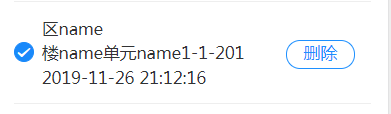
<div class="item" @touchstart="gtouchstart(item, item.id, $event)" @touchmove="gtouchmove($event, item, item.id)" @touchend="gtouchend(item, item.id)"><p class="cancel" v-show="item.show == 'true' && radio == item.id" @click="deleteHouse(item.isDefault)">删除</p>gtouchstart (item, id, e) { this.phone = checkDevice(); if (this.phone == "Android") { // 长按3秒 开始触摸 this.timeOutEvent = 0 this.timeOutEvent = setTimeout(() => { this.radio = id this.$set(item, 'show', 'true') }, 500) } else { this.moveDistance = 0 // 阻力滑动距离归0 this.move = 0 // 移动距离归0 this.startX = e.targetTouches[0].clientX // x轴归0 }},gtouchmove (e, item, id) { this.phone = checkDevice(); if (this.phone == "Android") { clearTimeout(this.timeOutEvent) this.timeOutEvent = 0 } else { // 获取左滑的距离 this.move = this.startX - e.targetTouches[0].clientX console.log(this.move) // move大于0,说明手指移动了 if (this.move > 0) { // 阻止默认事件,因为有些app会有默认事件 e.preventDefault() // 增加滑动阻力,尤为重要,如果不要这一步,上下滑动就会不经意触发左右滑动事件 this.moveDistance = Math.pow(this.move, 0.8) // 设置滑动的最大距离,如果阻力滑动的距离大于按钮的宽度,就赋值为按钮的宽度 if (this.moveDistance > this.distance) { // 如果滑动距离大于15 出现隐藏按钮 this.radio = id this.$set(item, 'show', 'true') } else { // 滑动距离并没有超过按钮的一半,给我归位 this.radio = '' this.$set(item, 'show', 'false') } } }},gtouchend (item, id) { this.phone = checkDevice(); if (this.phone == "Android") { clearTimeout(this.timeOutEvent) this.timeOutEvent = 0 } else { if (this.move == 0 && item.show == 'true') { // 触发点击事件 this.$emit('deleteHouse') } else if (this.move > 0 && item.show == 'false') { // 如果滑动结束 滑动距离大于右侧按钮的一半 则出现按钮,否则隐藏按钮 if (this.moveDistance > this.distance / 2) { this.radio = id this.$set(item, 'show', 'true') } else { // 滑动距离并没有超过按钮的一半,给我归位 this.radio = '' this.$set(item, 'show', 'false') } } else { this.radio = '' this.$set(item, 'show', 'false') } }},实现的效果是 长按一秒显示删除按钮
vue移动端长按事件触发删除按钮
https://blog.hhq688.com/posts/vue移动端长按事件触发删除按钮-106334257/ 
评论 待开启
评论基于 GitHub Discussions(Giscus)。仓库推送并开启 Discussions 后,在 giscus.app 获取
repoId/categoryId,填入src/config.ts的giscusConfig即可。HHQ-666/qingge-blog