

209 字
1 分钟
element 开关组件显示开关文字总结

本文同步自 CSDN · 清阿哥,原文发布于 2020-08-21。
1. 显示开关文字
表格中使用开关组件,官方例子的文字描述是显示在开关组件的后面,如何显示在组件上呢?废话不多说直接上教程。
html<el-table-column label="是否显示"> <template v-slot="scope"> <el-switch v-model="scope.row.show" class="switchStyle" :active-value="1" :inactive-value="0" active-text="开" inactive-text="关" active-color="#13ce66" inactive-color="#ff4949" @change="getBrandList(scope.row.id)" > </el-switch> </template>只有上面的html是不行的,需要调节下样式
<style lang="less">.switchStyle .el-switch__label { position: absolute; display: none; color: #fff;}.switchStyle .el-switch__label--left { z-index: 9; left: 6px;}.switchStyle .el-switch__label--right { z-index: 9; left: -14px;}.switchStyle .el-switch__label.is-active { display: block;}.switchStyle.el-switch .el-switch__core,.el-switch .el-switch__label { width: 50px !important;}</style>来看效果图
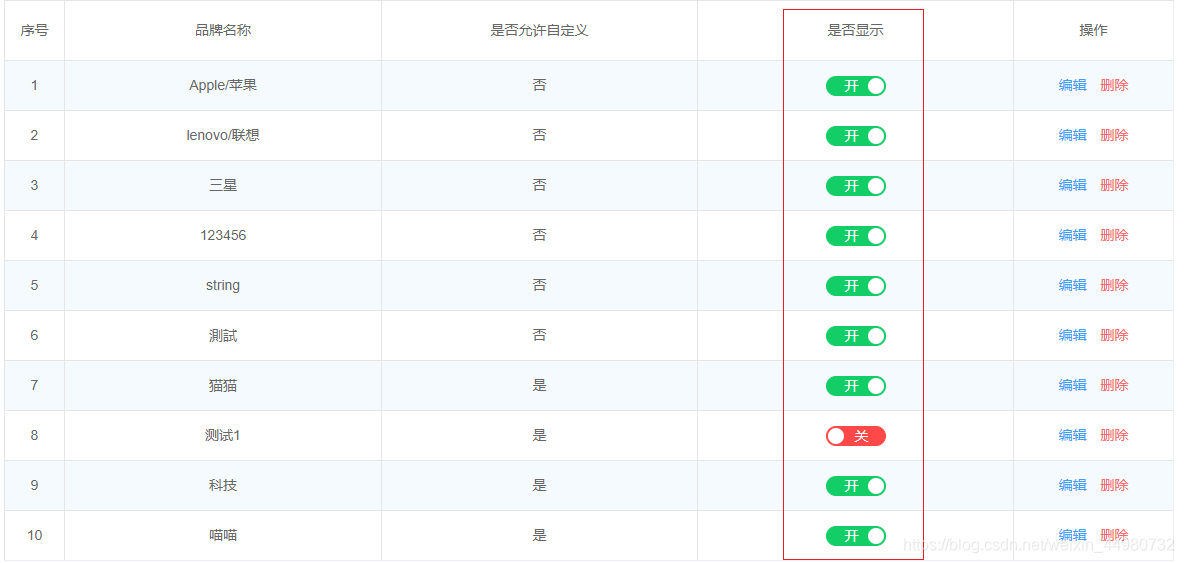
上面的组件的属性如果有不懂的地方可以自行看下官方文档,有什么问题欢迎在下方留言交流。
element 开关组件显示开关文字总结
https://blog.hhq688.com/posts/element-开关组件显示开关文字总结-108146575/ 

评论
评论加载中…